 SleuthLens
Pinterest analytics, explained
See which pins really work. Fix the ones that do not.
SleuthLens reads your own Pinterest numbers, sorts every pin by why it is weak, checks the pages your pins point to, and helps you write better ones. It only reads: it never posts or changes anything on Pinterest.
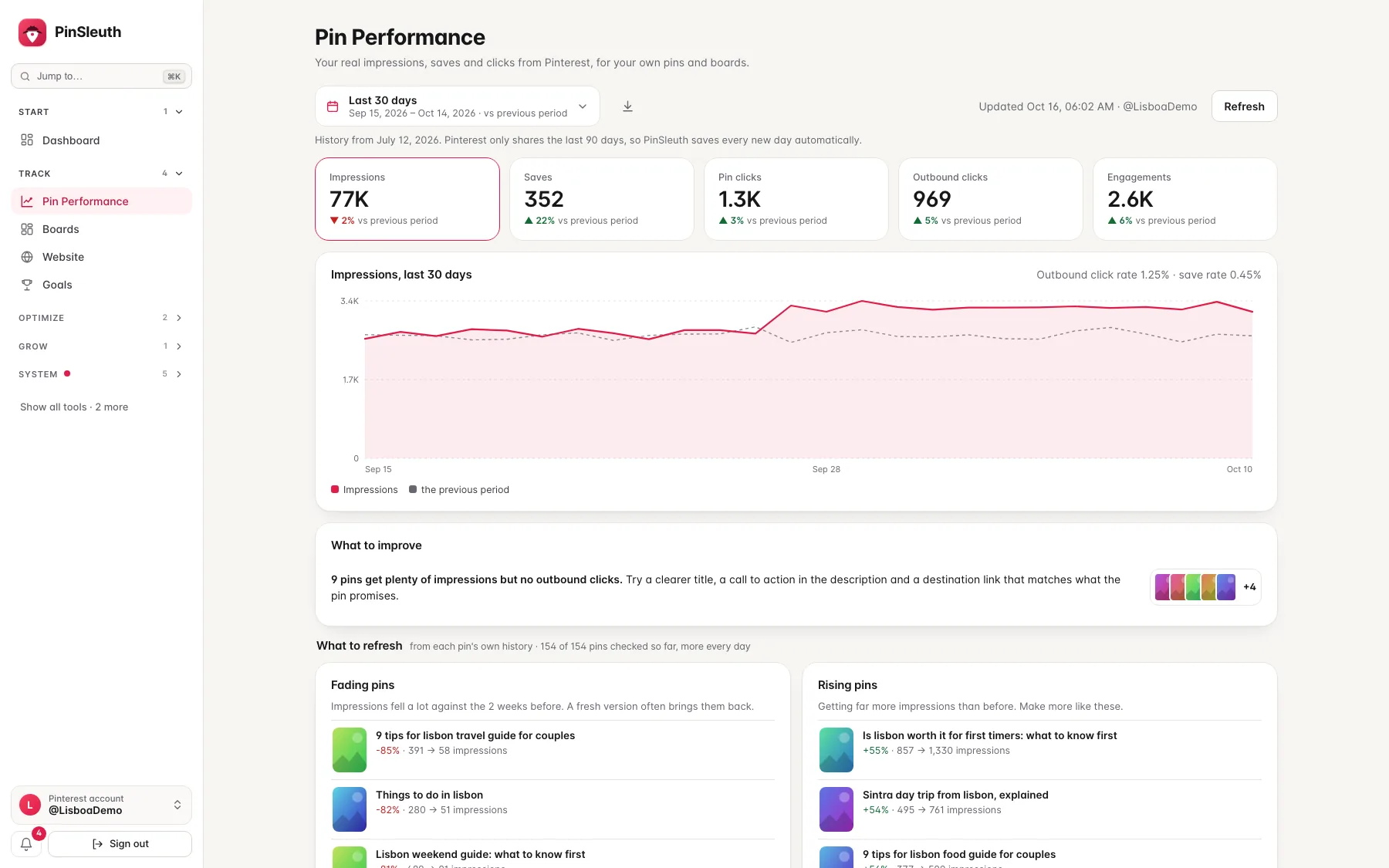
Your real impressions and clicks
Pin Health
Fading pin finder
Destination page checks
Pin writer that reads your page
Client reports
The whole loop
Look at the numbers, understand them, then fix what matters.
Most pins are weak for a reason you can fix. SleuthLens shows you which reason.
1
Measure
See what your pins really earn.
- Impressions, saves and clicks from Pinterest itself
- Each compared with the period before
2
Diagnose
Find out why a pin is weak.
- Broken, slow or mismatched pages
- Near-duplicates and thin text
- Pins that only need time, or their season
3
Fix
Improve what you already have.
- Fading pins and pins nobody clicks
- Proven posts that need fresh pins
- A writer that reads your page
Inside SleuthLens
From the first number to the weekly report
Real screens from the app, shown with sample data from a made-up travel blog.
Measure
See what your pins really do
Connect your Pinterest account and see impressions, saves, pin clicks and outbound clicks for your own pins and boards, each compared with the period before. SleuthLens only reads your data and never posts.
Fix
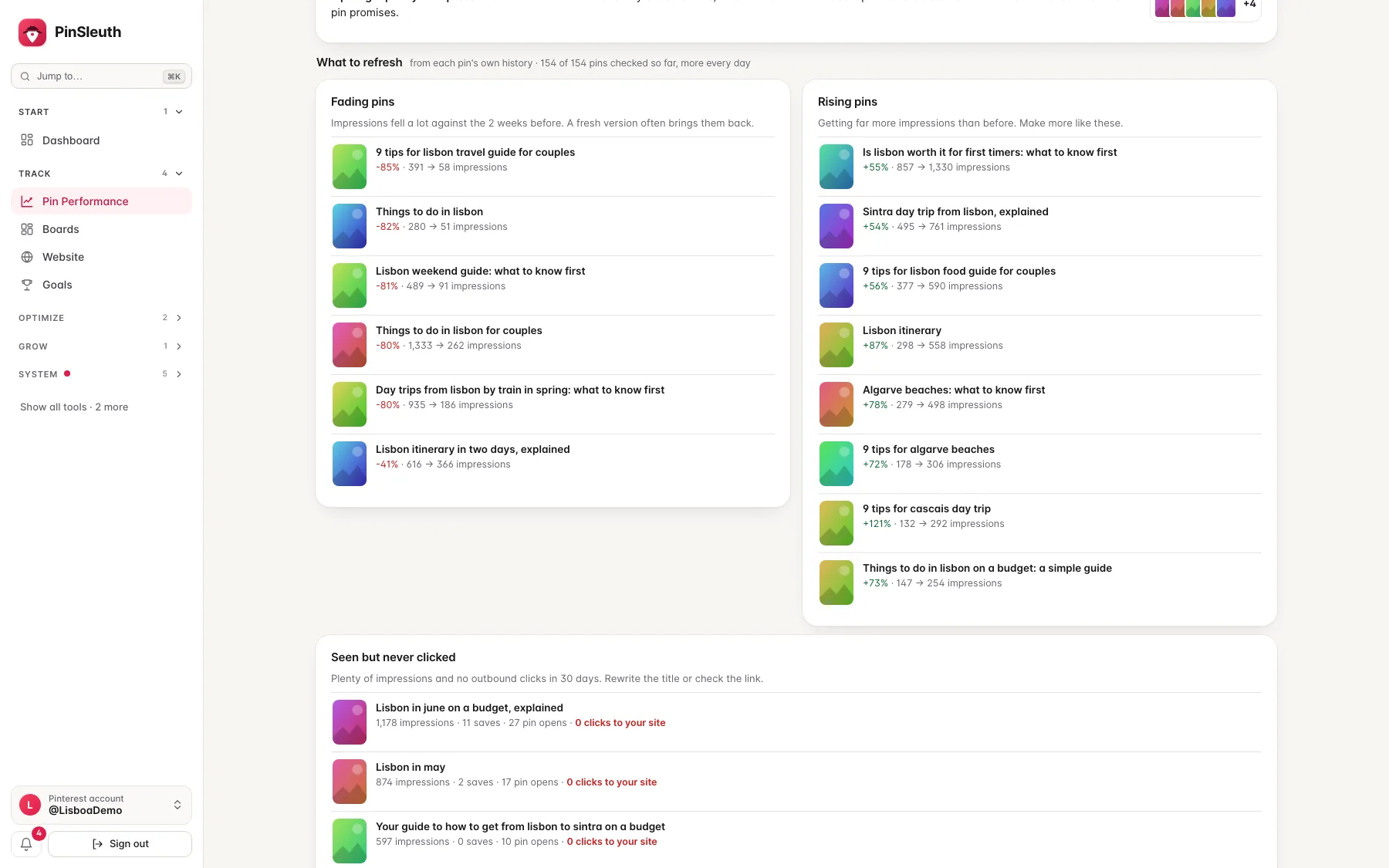
Know which pins to refresh
Fading pins, rising pins and pins that get seen but never clicked, worked out from each pin’s own history.
Measure
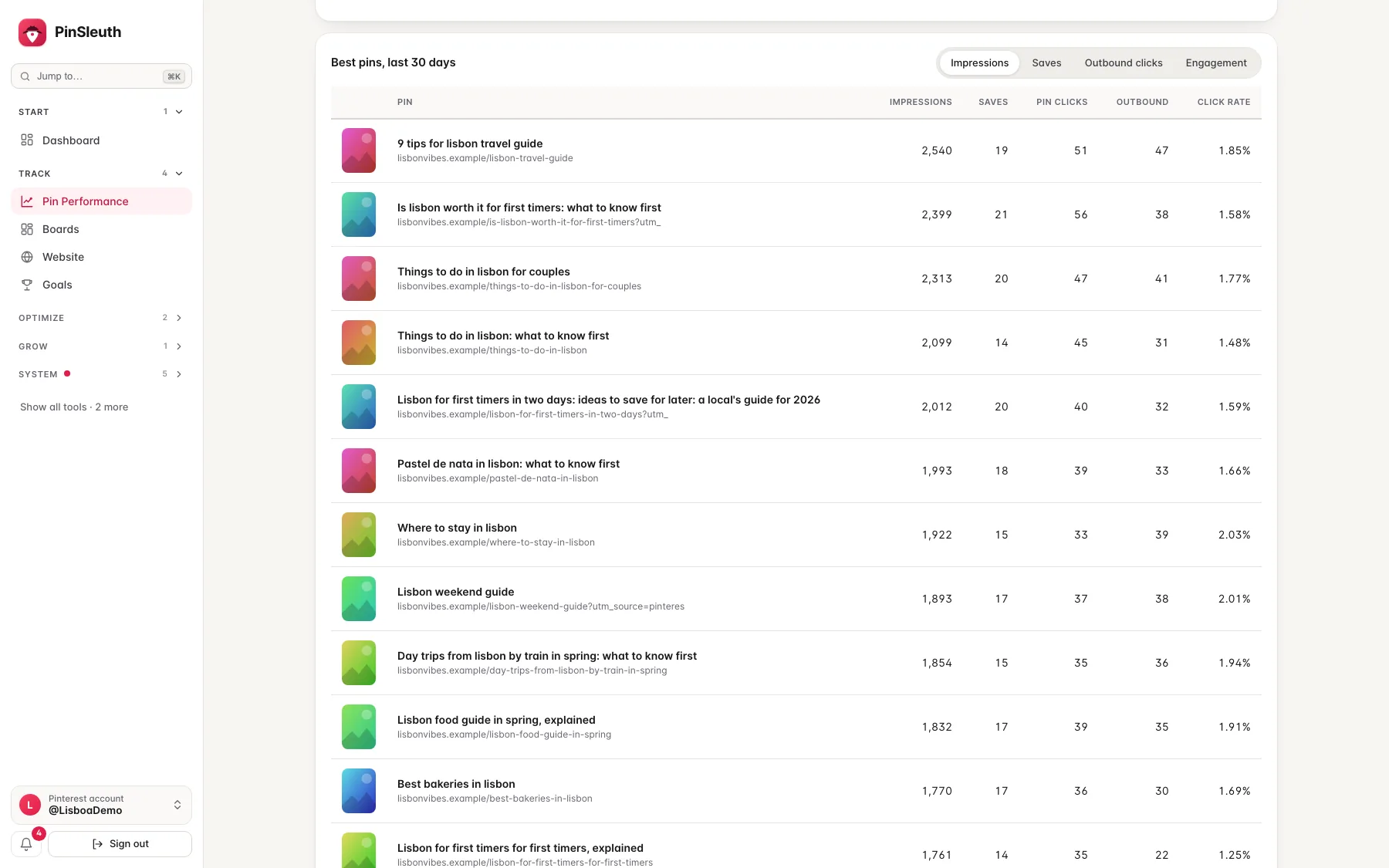
See which pins carry the account
Your best pins, ranked by impressions, saves, outbound clicks or engagement, with the click rate of each.
Plus Pin Health · goals · weekly digest · client reports
Pin writer
Write the pin from the page it links to.
Give the writer your keyword and the link of your page. It reads the page and drafts titles, descriptions, board names and alt text that match what the page really says. The browser extension puts it on Pinterest’s own pin creation page.
- Drafts written from your own page, never invented
- A check that your title matches the page it links to
- One click fills Pinterest’s own title and description fields
- It never posts or schedules anything for you
What changes
What do you do about a pin that is not working?
Seeing the numbers is the easy part. This is where most people are on their own.
| The usual way | With SleuthLens | |
|---|---|---|
| Judging a pin | Guess from a few numbers | Real impressions, saves and clicks, compared with your other pins |
| A weak pin | Delete it or leave it | Sorted by cause: broken page, duplicate, thin text, refresh, or just waiting for its season |
| Older posts | Forgotten | A list of proven posts that need fresh pins |
| Writing a pin | A blank page | Drafts written from the page the pin links to |
| Reporting to clients | Screenshots and spreadsheets | Branded report links and a weekly digest |
Bloggers and creators
- Know which pins to fix first
- See which pages let your pins down
- Replace spreadsheets and guesswork
Agencies and freelancers
- Several Pinterest accounts in one place
- Branded, read-only client reports
- Weekly digests that do the reporting for you
Pricing
Simple plans, cancel any time
Every plan starts with a 14-day free trial.
Solo
For one blog or shop getting started with Pinterest analytics.
Billed monthly$144 billed yearly
- 1 website
- Dashboard and Pin Performance
- Pin Health and the refresh finder
- Chrome extension and AI pin writer
Pro
For serious creators growing traffic from Pinterest.
Billed monthly$279 billed yearly
- 3 websites
- Everything in Solo
- Goals and alerts
- Weekly digest
Agency
For agencies and freelancers managing client accounts.
Billed monthly$759 billed yearly
- 15 websites
- Everything in Pro
- Branded client reports
- Team seats (up to 5 people)
Prices in US dollars, excluding VAT. Every plan starts with a 14-day free trial: cancel before it ends and you pay nothing. Sold to businesses and professionals.
Questions
Good to know
How is SleuthLens different from other Pinterest tools?
Many Pinterest tools are about keyword lists or scheduling. SleuthLens is about your own pins: how they really perform, why a weak one is weak, and what to fix. It is not a scheduler.
Is SleuthLens affiliated with Pinterest?
No. SleuthLens is an independent product. Pinterest is a trademark of Pinterest, Inc.
Where does the data come from?
Your impressions, saves, clicks, pins and boards come from Pinterest’s official API, once you connect your account. The checks on your pages come from opening the pages your pins link to, the way a visitor would.
Do I need to connect my Pinterest account?
Yes, to see your own numbers. You approve the connection on Pinterest’s own sign-in page. It is read-only, SleuthLens cannot post or change anything, and you can disconnect at any time and the data it saved is deleted.
Will it post or schedule pins for me?
No. SleuthLens is for measuring, diagnosing and writing. You publish on Pinterest yourself, or with the scheduler you already use.
How does the AI pin writer work?
You give it a keyword and the link of your page. It reads the page and drafts titles, descriptions and board names that match it. You review and edit everything before it goes live. It needs your own Anthropic key.
When can I start?
Right now. Pick a plan on the pricing page and start a 14-day free trial.
What will it cost?
Solo is $15 a month, Pro $29 and Agency $79, or about 20% less when billed yearly. Prices exclude VAT. Every plan starts with a 14-day free trial and you can cancel any time.
Start your 14-day free trial
Pick a plan, add a card, and pay nothing if you cancel within 14 days.